PDF Portal, Digital Parts Catalog, or Interactive Manual: Which One Do You Actually Need?
Three common paths for modernizing legacy manuals solve different parts of the problem. Here's what each one actually fixes, what it leaves unsolved, and how to tell which one matches the gap you have.
LumaRef Team
Content Team · · 7 min read
A Director of Aftermarket with a shared drive full of PDF manuals eventually reaches the same decision point: keep living with the shared drive, or modernize it. The harder question comes right after — modernize it into what? Three answers show up in most evaluations, and they solve genuinely different problems.
This guide walks through what a PDF portal, a digital parts catalog, and an interactive manual — a connected, web-based version of the technical content you already have, not simply a more clickable PDF — each actually fix, what each leaves unsolved, and how to tell which gap matches the one you're trying to close.
A PDF portal, a digital parts catalog, and an interactive manual solve different parts of the same problem — the right choice depends on whether your gap is access, ordering, or keeping parts and product data connected to the manuals they came from.
Three paths, one underlying question
Before comparing options, it helps to be specific about what modernize
actually needs to accomplish. Three questions cut through most of the
marketing language:
- Does the part number, diagram, and applicability information stay connected to the manual it came from, or does it get separated into a different system the moment it's digitized?
- Does the path end at a part number, or does it continue to a product a customer can actually order?
- Does adopting it require replacing the documentation system or the ecommerce platform already running the business?
Each of the three approaches below answers those three questions differently.
A PDF portal
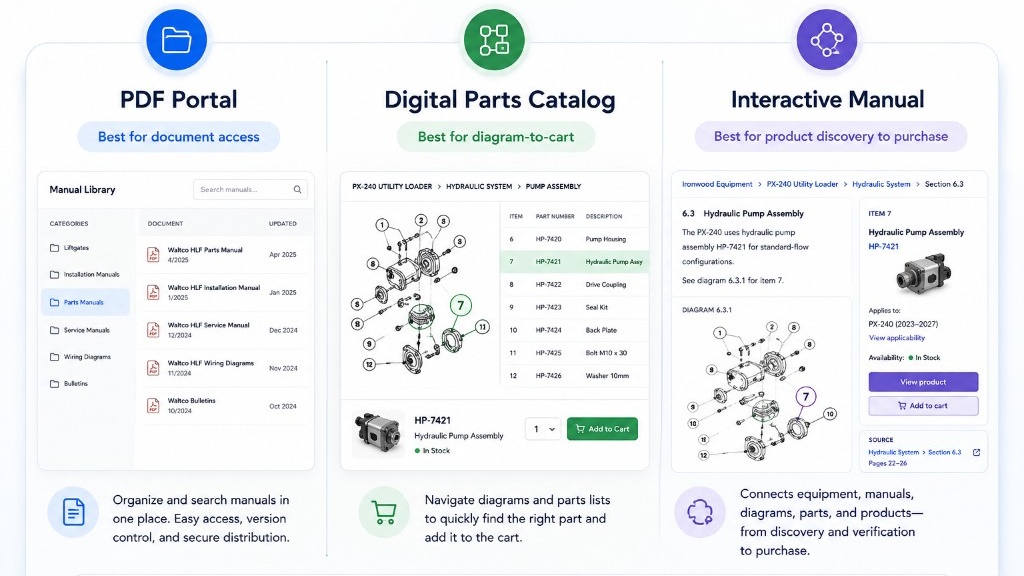
A PDF portal takes an existing library of manuals and puts it behind a website with a login, a folder structure, and usually a search box. It's often the first modernization step a company takes, because it's the least disruptive.
What it solves: findability and version control. Instead of emailing a PDF or hunting through a shared drive, customers and dealers can log in and search a maintained library. Nobody accidentally works from a superseded revision sitting in someone's downloads folder.
What it leaves unsolved: the content inside each PDF is still flat. A search result returns a page, not confirmation that it's the right page for a specific model — it doesn't tell a customer whether a diagram applies to their equipment, and it doesn't connect a part number to a current, orderable product. The manuals are easier to reach. What's inside them still has to be interpreted by a person.
A digital parts catalog
A digital parts catalog rebuilds the parts side of the documentation separately from the manual — typically a structured database of parts, often paired with exploded diagrams, with ordering built directly into the lookup.
What it solves: the path from diagram to order. A customer can click a component in an exploded view and add it to a cart in the same interface, which is a meaningfully shorter path than copying a part number into a separate storefront search.
What it leaves unsolved: the catalog usually has to be built and maintained as its own structured dataset, separate from the original manuals it was derived from. That means some of the same product knowledge — part numbers, item references, descriptions, model applicability, and diagrams — can exist in two places: the manual and the catalog. The manual can still be the record for procedures and specs, and the catalog can still be the system customers order from — but as manuals are revised, parts are superseded, or equipment changes, keeping the catalog aligned with the source documentation becomes an ongoing maintenance task, not a one-time project.
An interactive manual
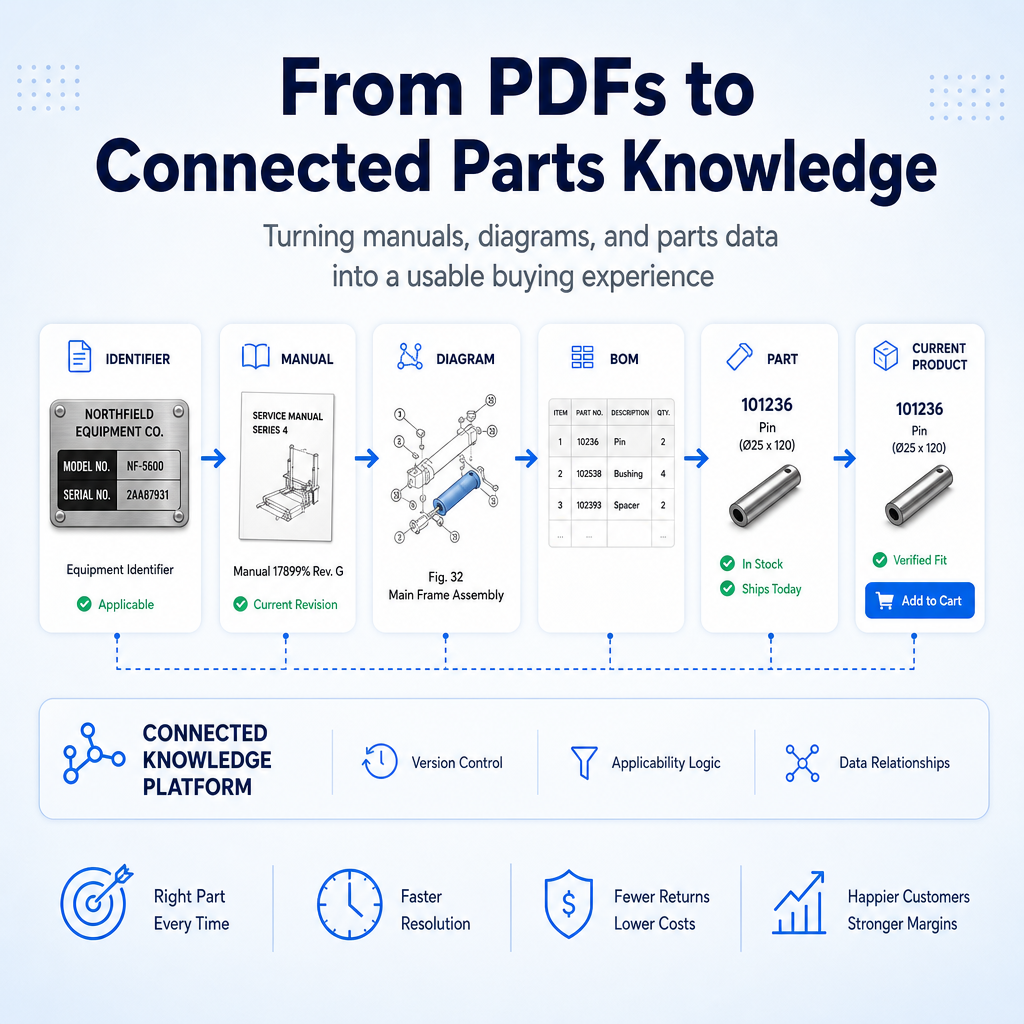
An interactive manual takes a manufacturer's existing technical content — the manuals, exploded diagrams, bill-of-materials tables, and part numbers already published — and turns them into a structured, connected web experience, instead of re-entering that information into a separate parts database. The manual is still the source; what changes is how someone navigates what's in it.
What it solves: the connection the other two approaches leave incomplete. A customer or dealer keeps the original diagram and bill-of-materials context instead of losing it to a separate system, while also getting information the source PDF doesn't provide on its own — which item on the diagram maps to which part number, which models a part applies to, and which current product to order. The resulting experience doesn't need to look or behave like a PDF; it just has to stay connected to the document it came from.
What it leaves unsolved: it works downstream of content creation, not in place of it. A manufacturer still writes, revises, and approves a manual, a diagram change, or an updated spec through whatever engineering or publications process it already has — an interactive manual picks up that content once it's published and connects it to parts and products. Redrawing a diagram or revising a warning still happens the same way it always has; the interactive manual reflects that change once it's released, rather than giving the manufacturer a second place changes have to be made.
How to evaluate any option
Whatever a vendor or an internal team proposes, the same three questions from the first section hold up as evaluation criteria:
- Source connection — does the experience keep parts and product information connected to the original diagram, bill-of-materials row, and technical content it came from, or is that connection maintained separately, with its own risk of drifting out of sync?
- Action — does the experience end at a part number, or continue to a product someone can order today?
- Replatforming risk — does adopting it require replacing the documentation system or the ecommerce platform already in place, or does it work alongside both?
None of the three paths is built to score well on all three at once — each one solves a specific one or two of these questions well, which is why matching the option to the actual gap matters more than picking whichever one sounds the most modern.
Matching the option to the problem you have
If the actual complaint is our manuals are hard to find,
a portal solves
it. If the complaint is we can't get from a diagram to an order fast
enough,
a parts catalog addresses that specific step. If the complaint
sounds more like our diagrams, parts data, and manuals keep drifting out of
sync, and we're not confident the part someone finds still matches the
current manual
— the gap is the connection between the technical content
and the parts it describes, which is what an interactive manual
is built to close.
The bottom line
None of these three paths is universally right — they solve different
problems, and a shared drive of PDFs can genuinely need all three eventually.
The mistake is treating modernize the manuals
as one project with one
answer, when the real question is which specific gap — access, ordering, or
connection — is actually costing you time, calls, or sales today.
See how a connected interactive manual works on real OEM content
LumaRef turns a manufacturer's existing manuals and diagrams into a connected interactive manual — no re-entered parts database, no documentation replatforming. Talk to us about your existing manuals and parts catalogs.